

Where: Platform → Testing page (
/testing) — or just ask Seb to draft one from the Agents page (see Set up from chat). Hardware bridges also require seb connect running on the host with the hardware attached.Procedures
A procedure is a named verification step saved on the project. Agents run them during implementation to validate their work, giving you confidence in the code they produce. Common shapes:- Smoke test — boot the firmware, check the expected strings on serial.
- Calibration check — run a routine, compare results against expected ranges.
- Regression — replay a captured CAN sequence, assert no unexpected frames.
Add a procedure
The quickest way is to have Seb draft one for you from chat. You can also set one up manually: Testing page → procedure list → + Add procedure opens an editor. Fill in:- Title and tags — a name and optional categories.
- Where it runs — the agent’s cloud VM, or your machine via local Seb (for licensed toolchains or hardware-bound builds).
- Steps — the shell commands to run, each with a working directory and timeout.
- Output files — path globs to capture from the run.
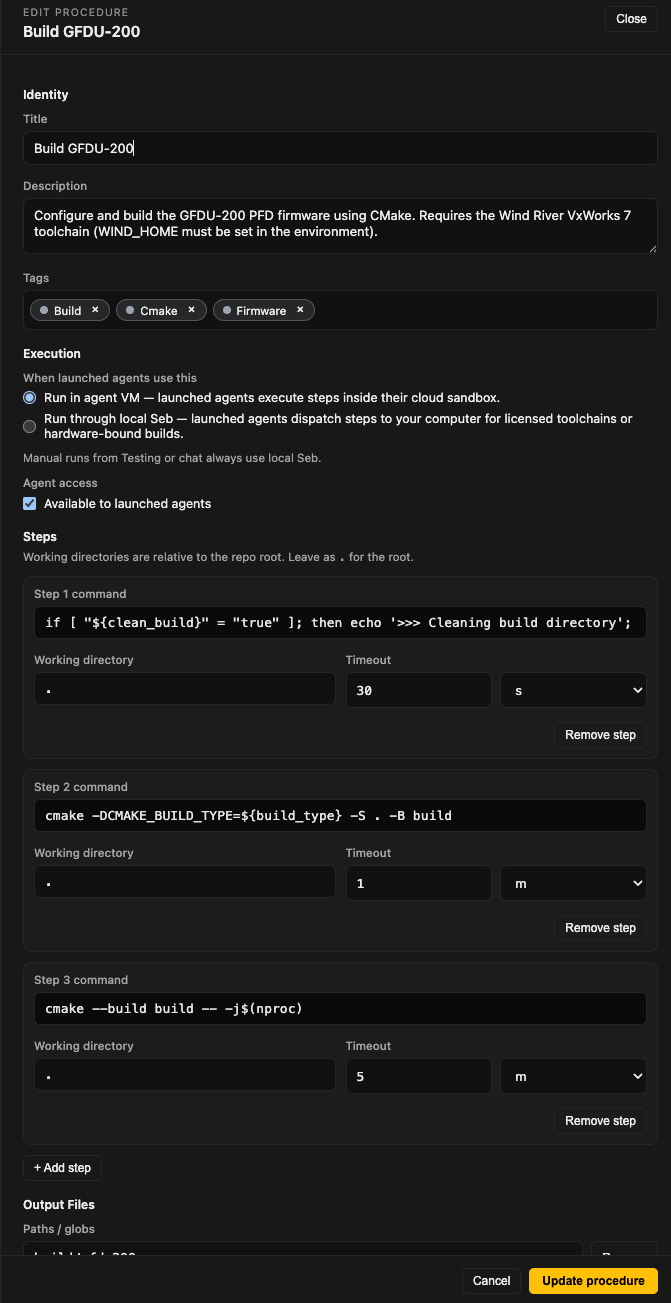
Run a procedure
Click Run on a procedure card. If it takes inputs, a dialog asks for them; live output streams in a side pane. Each run is recorded with timestamp, outcome, and operator.Bridges (hardware links)
A bridge is a live stream from a device connected to your host machine.
Add a bridge from the Testing page → bridge list → + Add.
The Connection status pill in Platform’s header shows whether a host is online. Without an active host, bridges can’t stream and procedures that touch hardware won’t run.
Set up from chat
You don’t have to build any of this by hand. On the Agents page, ask Seb and it drafts the setup for you:Write a procedure that builds the firmware with CMake and captures the ELF.
Set up the serial console on USB device A50285BI at 115200 baud.
For a custom procedure, Seb reads your repo and fills in the title, steps, where it runs, and output files; for a built-in bridge (serial console, CAN bus, …), it fills in the connection fields. Either way it posts a proposal card — nothing is saved yet — and you click Save to Testing tab. The result lands on your Testing page identical to a manual setup: runnable by you and by launched agents, and editable in the procedure editor above.