

Where: Platform → Agents page. The left side is your chat with Seb; the right side is the Agents rail, where launched jobs live.
Launch an agent
You launch agents straight from chat — there’s no separate form.- Describe the task. Open the Agents page and tell Seb what you want, in plain language: “Add CAN error-frame handling to the motor controller.” Use + to start a fresh conversation, or the history dropdown to reopen an earlier one.
- Add context and tune the run (optional).
- Mention a ticket — with the project linked to Jira or Linear, type an identifier like
KAN-42orROO-1163and Seb pulls the ticket in as context. - Paste a screenshot — drop an image into the composer (⌘/Ctrl+V).
- Pick the branch — the branch pill in the composer shows what Seb is reading from; click it to switch.
- Choose a model — the model picker in the composer; defaults to your global default from Profile → Model.
- Mention a ticket — with the project linked to Jira or Linear, type an identifier like
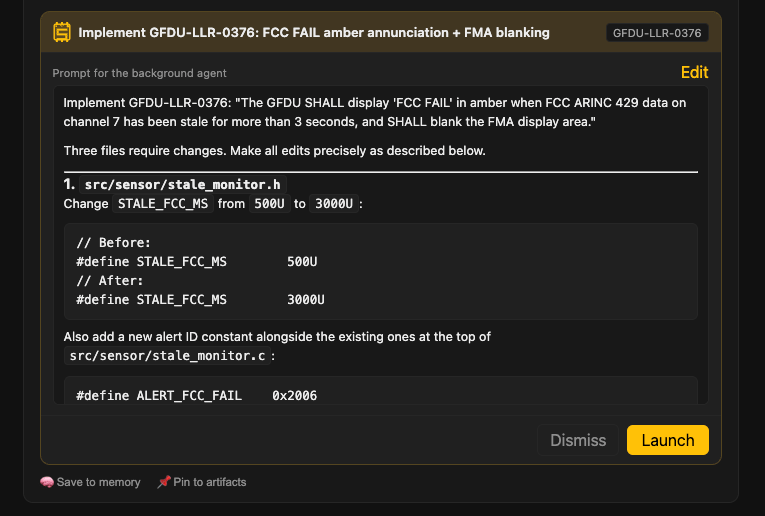
- Review Seb’s proposal. Seb replies with a proposal card showing a plan (the files it’ll change) and a test plan (the checks it’ll run, tagged cloud-VM or hardware). Edit the prompt on the card if you want to adjust scope.
- Launch. Click Launch on the card. The job starts and shows up in the Agents rail.
The Agents rail
Launched jobs are grouped by state on the right:- Queued — proposed, or waiting to start.
- In Progress — running, or blocked on a dependency.
- In Review — Seb has a PR ready. Open the job for the summary, files changed, and PR link, plus Send Back, Complete (accept), and Dismiss (reject).
- Needs Attention — failed. A failed job has a Relaunch button that retries it fresh from the original prompt.
- Done — completed, dismissed, merged, or cancelled.
Where tests happen
The agent runs your test bench procedures as part of its loop:- Software-only procedures run on the agent’s cloud machine. No setup needed.
- Hardware procedures reach your attached hardware to run tests and debug during implementation. See Test benches for setup.