> ## Documentation Index
> Fetch the complete documentation index at: https://docs.rootaccess.ai/llms.txt
> Use this file to discover all available pages before exploring further.
# 5. Review in the CLI
> Pull a finished agent's PR into your terminal, pair with Seb on the change, run more tests, and commit back.
The CLI runs Seb in your terminal. Its primary use is reviewing the PR an agent just produced; the same `seb chat` also pairs with you on code, runs hardware tests locally, and serves bridges back to Platform.
Reviewing in the CLI gives you a reviewer that already knows the project and branch — ask questions about the change, run hardware procedures the agent's cloud machine can't reach, and push edits back through the same chat that drafted them.
**Where:** your terminal, with [`seb` installed and `seb connect` previously run](/install).
## Pull the PR
```bash theme={null}
cd path/to/your/repo
seb chat
```
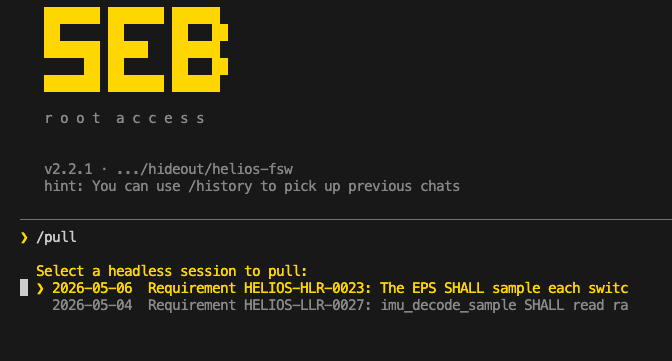
Once in chat, pull the agent's PR:
```
/pull
```
`/pull` lists open PRs, checks out the agent's branch, updates your working copy, and opens the chat with the agent's summary already loaded.
 ## What to do next
* **Read the diff and ask questions.** "Why this approach?" "What about the locking around line 80?" Answers are grounded in the actual change.
* **Run more tests.** Anything that runs on your machine — including hardware procedures that need your bench attached — works the same as it does on the agent's side, because `seb connect` is already up.
* **Edit the code directly.** Make changes in the file tree; Seb sees them as they happen.
* **Paste a screenshot.** Paste an image into the prompt with `Ctrl+V` — a scope capture, a board photo, an error on a display. It drops in as an `[Image #1]` placeholder and Seb reads it alongside the diff. (On WSL, paste reads the Windows clipboard.)
## Pick up on either surface
Chats sync across the CLI and Platform. A session you start in `seb chat` shows up in the Platform's chat history tagged **CLI**, and a Platform chat is resumable here with [`/history`](/reference/slash-commands) — so you can switch surfaces mid-task without losing the thread.
## Commit back
When the change is good, ask Seb to commit and push:
> Commit these changes with message "review: tighten error handling in motor\_init" and push.
The PR updates on top of the agent's branch. On Platform's Agents page, the row stays in **In Review** until you click **Complete** (or the PR merges on GitHub).
## Next
From here, cycle: launch more agents ([step 3](/guide/run-agents)), add procedures ([step 4](/guide/test-benches)). Reference: [CLI commands](/reference/cli-commands), [slash commands](/reference/slash-commands), [Platform map](/reference/platform-map).
## What to do next
* **Read the diff and ask questions.** "Why this approach?" "What about the locking around line 80?" Answers are grounded in the actual change.
* **Run more tests.** Anything that runs on your machine — including hardware procedures that need your bench attached — works the same as it does on the agent's side, because `seb connect` is already up.
* **Edit the code directly.** Make changes in the file tree; Seb sees them as they happen.
* **Paste a screenshot.** Paste an image into the prompt with `Ctrl+V` — a scope capture, a board photo, an error on a display. It drops in as an `[Image #1]` placeholder and Seb reads it alongside the diff. (On WSL, paste reads the Windows clipboard.)
## Pick up on either surface
Chats sync across the CLI and Platform. A session you start in `seb chat` shows up in the Platform's chat history tagged **CLI**, and a Platform chat is resumable here with [`/history`](/reference/slash-commands) — so you can switch surfaces mid-task without losing the thread.
## Commit back
When the change is good, ask Seb to commit and push:
> Commit these changes with message "review: tighten error handling in motor\_init" and push.
The PR updates on top of the agent's branch. On Platform's Agents page, the row stays in **In Review** until you click **Complete** (or the PR merges on GitHub).
## Next
From here, cycle: launch more agents ([step 3](/guide/run-agents)), add procedures ([step 4](/guide/test-benches)). Reference: [CLI commands](/reference/cli-commands), [slash commands](/reference/slash-commands), [Platform map](/reference/platform-map).